Picture Slice
Split images in batches, locally. Average, fixed-size or by guide lines.

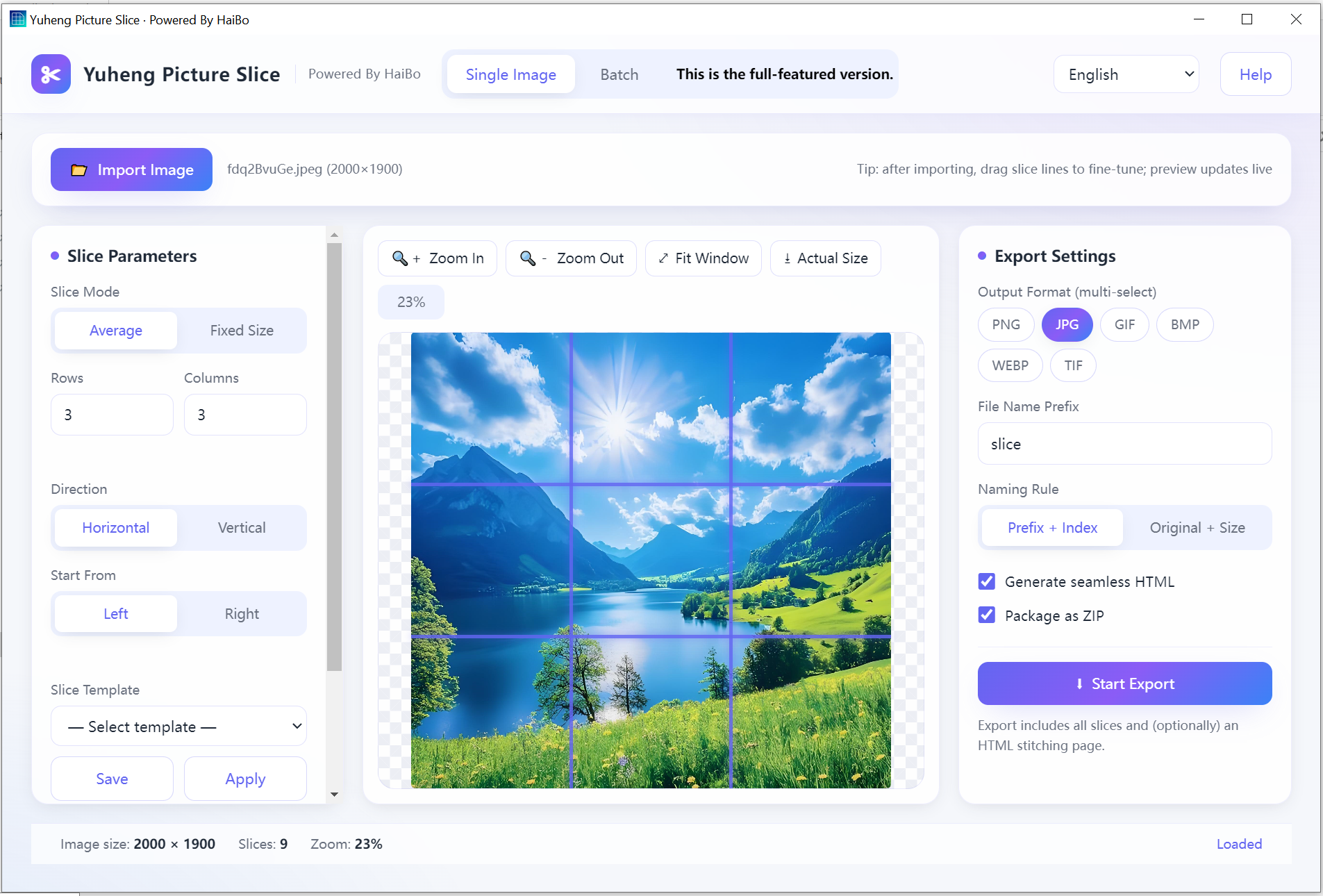
Splits big images into tiles on your PC. By rows and columns, by fixed pixel size, or with guide lines you drag yourself. Settings can be saved as a template.
Average & fixed split
Rows/cols or exact pixel size.
Draggable guides
Drag lines to set cuts visually.
Templates
Save and reuse slice settings.
Seamless stitch
Export a stitched HTML preview.
Product Details
A locally-run image slicing tool that splits single or batch images into multiple pieces by equal rows/columns or fixed dimensions. Features include draggable split lines, template saving, real-time preview, various zoom levels, and automatic generation of seamless stitching HTML code. Supports multi-format export including JPG, PNG, GIF, BMP, WEBP, and TIF. Available in multiple languages. The software runs entirely offline to protect the privacy and confidentiality of your photos. This is the complete version with all features unlocked.
- Average Split: set rows/columns, row-wise/column-wise, left-to-right or right-to-left direction
- Fixed-Size Split: split by setting width and height (in pixels)
- Draggable Split Lines: click to select a split line, then drag to adjust its position
- Split Templates: save current settings for reuse, rename, or delete (localStorage)
- Batch Split: batch-slice images by average/size/template, custom direction, thumbnail and detail view modes
- View Controls: zoom in, zoom out, actual size, fit to window
- Real-Time Preview: split lines and effects displayed live on the canvas
- Export Settings: same folder / save as, output format (JPG/PNG/GIF/BMP/WEBP/TIF), custom filename prefix or "original filename + counter + width×height"
- Auto-Generate Seamless HTML: automatically assembles slices into a seamless browser-displayable page
- System
- Windows 10 / 11 (64-bit)
- Download size
- 11 MB
- Memory
- 2 GB
Learn more · How to use
Open the app
Launch Picture Slice on Windows.
Load image
Open the large image to slice.
Choose mode
Average, fixed-size, or drag guide lines.
Export
Save tiles and an HTML preview.
Formats: Input: JPG, PNG, WEBP · Output: same formats + HTML
What's new
- Split templates can now be renamed.
- The HTML preview opens correctly in Firefox.
FAQ
No. Slicing runs fully on your PC.
Average by rows/cols, fixed pixel size, or manual guides.
No. Save the current split lines and options as a template, then apply the same setup to the next image with one click.
Why download from Microsoft Store
Safe, simple, and always up to date, the way software should be.
Automatic updates
Get the latest features and fixes the moment they're released, no manual downloads, no reminders.
Security certified
Every app is verified by Microsoft, so you can install with confidence, no malware, no surprises.
One-click install
Click Get and you're done. No installers to run, no permissions to configure, it just works.
