Image Watermark
Add text or logo watermarks to images in one click: batch ready.

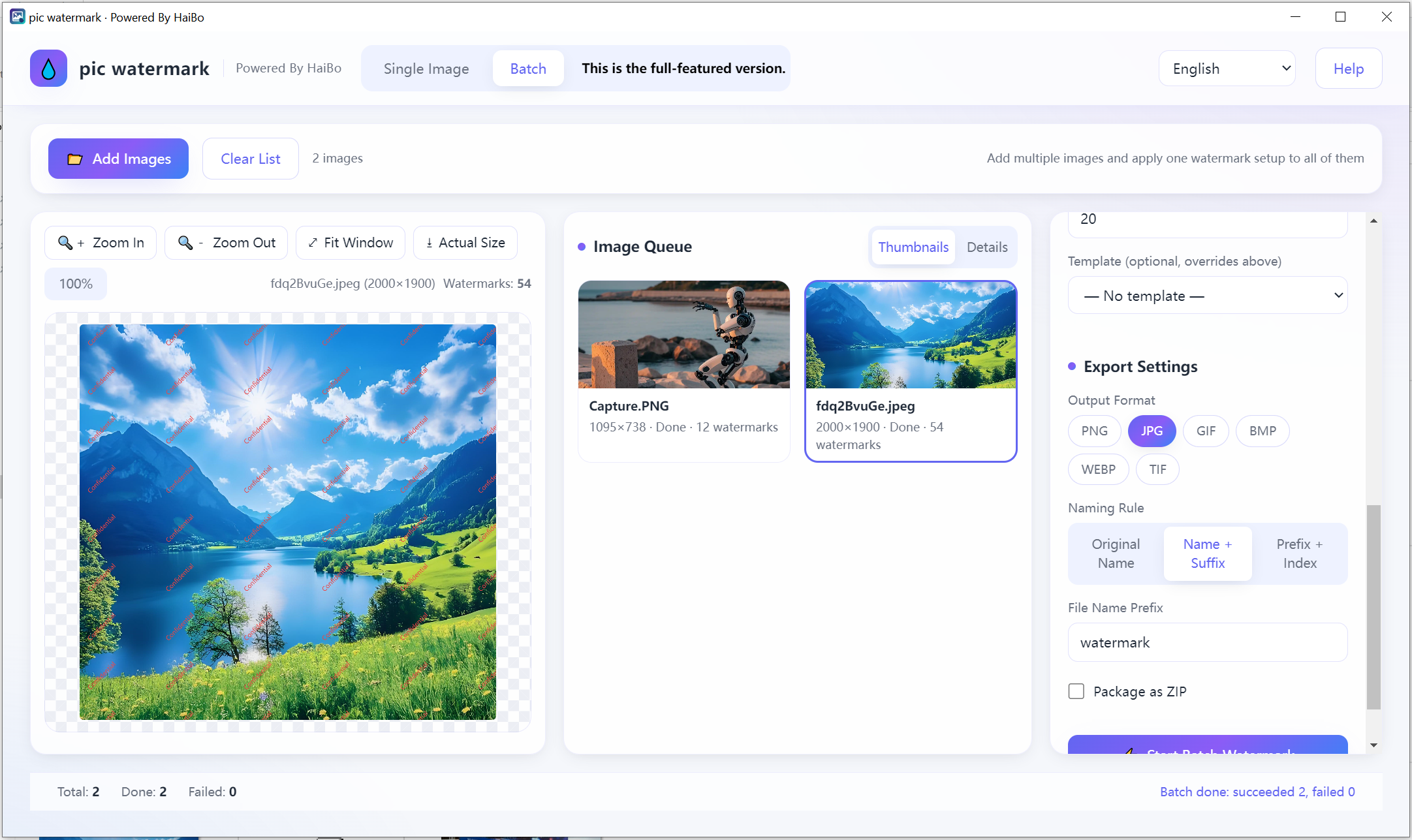
Adds watermarks to your photos locally. Pick text or a logo, set opacity and rotation, then run it over a whole folder at once.
Text & logo
Use words or your brand logo.
Opacity & rotation
Fine-tune look easily.
9-grid or tiled
Place or repeat the mark.
6 formats
Batch export ready.
Product Details
pic watermark is a fast, lightweight Windows app for protecting and branding your photos. Add text or image-logo watermarks, fine-tune opacity, rotation and layout, then export in bulk to the format you need. It runs entirely offline with zero external dependencies, your images never leave your PC.
- Two watermark types. Custom text (content, size, font, color) and image/logo (resizable)
- Precise control: opacity slider 0–100%, rotation at −45°/−30°/0°/30°/45°
- Flexible layout. Single placement with a 9-grid position picker, or tiled mode that fills the whole image with adjustable spacing and margins
- Real-time preview: WYSIWYG canvas; preview and export share the same rendering engine for pixel-perfect results
- 6 output formats, PNG, JPG, GIF, BMP, WEBP, TIF (multiple selectable at once)
- Batch processing. Watermark dozens of images at once with a single setting; live progress and success/failure stats
- Smart naming & ZIP. Original name / name+suffix / prefix+index, optional ZIP packaging
- Templates, save your favorite watermark setups and apply them in one click (stored locally)
- 9 interface languages, including English, Français, Deutsch, Español, Italiano and more
- Privacy-first. No network required, no CDN, all processing happens locally
- System
- Windows 10 / 11 (64-bit)
- Download size
- 16 MB
- Memory
- 2 GB
Learn more · How to use
Open the app
Launch Image Watermark on Windows.
Add photos
Load one or many images.
Set watermark
Choose text/logo, opacity, rotation, layout.
Export
Save in 6 formats, batch supported.
Formats: Input: JPG, PNG, WEBP · Output: JPG, PNG, WEBP, BMP, TIFF, GIF
What's new
- Watermark presets can be saved and reused.
- Fixed uneven spacing in tiled mode on very wide images.
FAQ
No. Watermarking runs fully on your PC.
Single placement (9-grid) or tiled repeat.
Yes. Save the text or logo, its opacity and position as a template, then apply the same watermark to the next batch with one click.
Why download from Microsoft Store
Safe, simple, and always up to date, the way software should be.
Automatic updates
Get the latest features and fixes the moment they're released, no manual downloads, no reminders.
Security certified
Every app is verified by Microsoft, so you can install with confidence, no malware, no surprises.
One-click install
Click Get and you're done. No installers to run, no permissions to configure, it just works.
